How to Turn a GIF Into a Sticker: Static vs. Animated
By Shafiullah Tareen, creator of ZipGIF · Published
Short answer: a GIF file is not automatically a sticker. Whether your GIF works as one depends on where you send it, and on whether you want it to move. On Discord, a GIF can be uploaded as a guild sticker directly, as long as it fits the 512 KiB cap. On Telegram, it cannot: the GIF must become a static PNG or WebP image, a WebM video, or a rebuilt vector animation, each with its own size, dimension, and duration rules. So pick the platform, pick static or animated, then export to exactly the format that platform accepts.
A GIF, a static sticker, and an animated sticker are three different things
A GIF is a file format. An animated GIF is a stack of frames, each with its own delay stored in hundredths of a second, drawn from a palette of at most 256 colours. Its transparency is binary: a pixel is either fully transparent or fully opaque, because the format marks one palette entry as transparent and nothing in between (GIF89a specification). A GIF can loop, but the loop instruction is extra data attached to the file, not the picture itself.
A sticker is a role, not a format: an image or short animation that a chat platform displays at a fixed size, usually with a transparent background, and sends as a reaction rather than as a file attachment. What counts as a sticker is decided entirely by the platform: its accepted formats, dimensions, file-size cap, and duration limit.
That is why the same artwork can be a static sticker, an animated sticker, or neither, depending on how it is exported: a single frame saved as a PNG is a static sticker, the full animation re-encoded as WebM can be a video sticker, and the same animation uploaded as a .gif file is a sticker on Discord but not a sticker upload at all on Telegram. Nothing about the GIF changes between those outcomes; only the export and the destination do.
So “convert GIF to sticker” is not one operation with one button. It is a chain of decisions, and skipping any of them is how most failures happen: the wrong format, the wrong dimensions, a file over the cap, or motion the destination silently drops.
The three sticker kinds
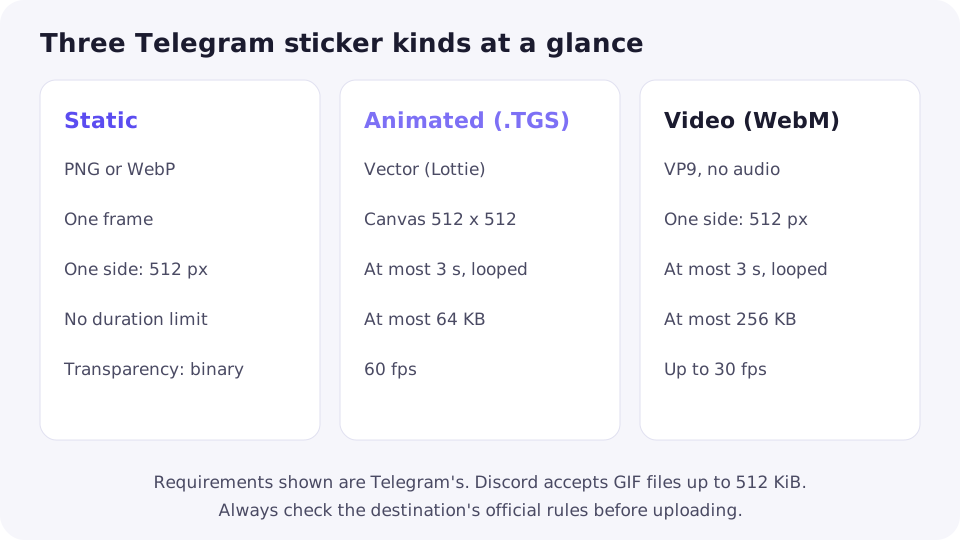
Static stickers are single images. On Telegram they are PNG or WebP files. One side must be exactly 512 pixels and the other 512 pixels or less, so a wide sticker can be 512 wide and shorter, but never larger. Telegram's custom emoji are a separate, smaller case: exactly 100 by 100 pixels (Telegram sticker documentation).
Animated stickers on Telegram are vector animations in the .TGS format, which is a gzipped Lottie animation. The canvas must be 512 by 512 pixels, the animation must loop, last at most 3 seconds, run at 60 frames per second, and stay under 64 KB. Because .TGS is vector data, not pixels, it cannot be produced by converting a GIF: the artwork must be built as vector shapes, typically in After Effects and exported with the Bodymovin-TG plugin.
Video stickers are the middle path. On Telegram they are WebM files encoded with the VP9 codec, with no audio stream: one side exactly 512 pixels, duration at most 3 seconds, frame rate up to 30 frames per second, size under 256 KB, and looping for the best experience. A single Telegram sticker set can even mix static, animated, and video stickers (Telegram API sticker documentation).
Discord works differently, which is exactly why platform requirements matter: its guild sticker upload accepts PNG, APNG, GIF, and Lottie JSON files up to 512 KiB. A GIF is therefore a legitimate Discord sticker file if it fits the cap, while the same GIF uploaded to Telegram is not a sticker at all, because Telegram's sticker uploads are PNG, WebP, and WebM files, plus vector animations through its sticker tools (Discord sticker documentation).
| Kind | Format | Dimensions | Duration | Size | Motion |
|---|---|---|---|---|---|
| Static sticker | PNG or WebP | One side exactly 512 px, other 512 px or less | None (single image) | No size cap stated in the requirements | None |
| Animated sticker (.TGS) | .TGS (Lottie vector) | Canvas exactly 512 by 512 px | 3 seconds maximum, looped | 64 KB maximum | Vector animation at 60 fps |
| Video sticker | WebM (VP9, no audio) | One side exactly 512 px, other 512 px or less | 3 seconds maximum, looped | 256 KB | Video up to 30 fps |
Which kind should you make?
Start from the destination, not from the file. If the GIF's motion is the joke, a static sticker throws it away, leaving a video sticker or a rebuilt vector sticker. If one frame reads clearly on its own, static is simpler, smaller, and accepted everywhere.
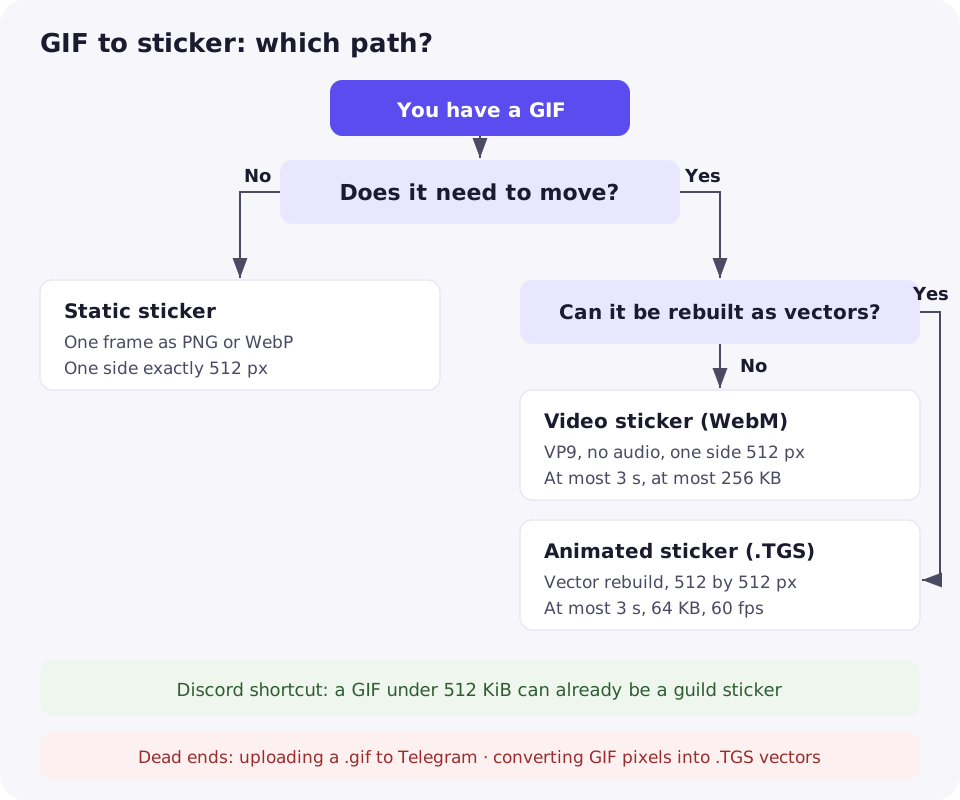
For Telegram, the decision runs like this: does it need to move? If not, export one frame as PNG or WebP at 512 pixels. If it does, can the artwork be rebuilt as vector shapes? If yes, build a .TGS animation. If not — the usual case for a GIF made from video or a screen recording — trim the best 3 seconds and export a WebM video sticker. For Discord, check the file first: a GIF under 512 KiB may already be a valid sticker with no conversion at all.
The figure below follows that logic: every path ends at a format the destination actually accepts, and the two dead ends are the mistakes this guide exists to prevent — uploading a GIF where GIFs are not accepted, and trying to convert pixels into a vector format.
What survives the conversion, and what does not
Going to a static image loses motion and keeps one frame. Everything else about that frame survives intact: its colours, already limited to the GIF's 256-colour palette, and its binary transparency. What does not survive is any soft edge. A GIF has no partial transparency, so a glow, shadow, or anti-aliased edge was already fully opaque or fully transparent in the source. Saving that frame as a PNG cannot soften edges that were never soft, and if the GIF had no transparency at all, the sticker carries its background unless an editor cuts it out first.
Going to a video sticker keeps the motion but re-encodes it. The 256-colour palette limit disappears, because video is not palette-based, and transparency is supported in WebM. What changes is timing and weight: the clip must fit 3 seconds and 256 KB on Telegram, and a GIF faster than 30 frames per second is retimed to fit the cap. Trimming to the best moment is usually what makes an over-long, over-size GIF fit.
Going to a vector sticker keeps nothing pixel-based. The .TGS format stores shapes and keyframes, not frames of pixels, so a GIF cannot be converted into one by any export setting. The animation must be redrawn and re-timed at 60 frames per second, inside a 64 KB budget that forces simple artwork. That is a rebuild, not a conversion: if someone promises one-click GIF-to-TGS conversion, the result will not be a genuine vector sticker.
The workflow, step by step
- Identify the platform and the sticker type. Sticker and emoji differ on the same platform: Telegram stickers use a 512-pixel side while Telegram emoji are exactly 100 by 100 pixels. Confirm which one you are making before resizing anything.
- Decide static or animated. Pick the frame that reads on its own for a static sticker, or the 3-second moment that carries the motion for an animated one.
- Prepare the artwork and background. If you want a cut-out look, the background must actually be transparent in the exported file; a GIF with a solid background will not become transparent by changing its file extension.
- Trim, resize, or convert only as required, and only with tools that support the operation. Trimming to 3 seconds, resizing to 512 pixels, and exporting one frame as a PNG are three separate operations, each needing a tool that really does it.
- Check the exported file against the destination's official requirements. Format, dimensions, duration, file size, and, for video, no audio stream. Check the numbers, not your memory of them — platforms change their limits.
- Upload through the platform's own process. The @Stickers mini app on Telegram, which accepts PNG, WebP, and WebM uploads, or the guild's sticker upload on Discord. A file that never goes through the platform's sticker flow is just a file, however good it looks.
What ZipGIF can and cannot do
ZipGIF has no sticker exporter, and this article does not pretend otherwise: there is no button here that turns a GIF into a Telegram or Discord sticker, uploads it, or builds a vector animation. What ZipGIF does have is the preparation steps around that gap, all running in your browser with no upload.
To trim a GIF to the 3 seconds a video sticker allows, use the GIF trimmer: drag the start and end handles around the moment you want, and the kept frames keep their original timing. To set the dimensions, use the GIF resizer, which has a Telegram Sticker preset at 512 by 512 pixels; the preset sets dimensions only, so the output is still a GIF until you convert it elsewhere. To make a static sticker, pick the best frame with the GIF splitter, which shows every frame with its number and delay, then export it as a PNG with the GIF to PNG converter, which keeps the GIF's transparency. To fit a size cap, use the GIF compressor to shrink the file before export.
What remains outside ZipGIF is the format step itself: encoding a WebM video, rebuilding a vector animation, cutting out a background, and uploading to the platform. Those need a video editor, a vector animation tool, an image editor, and the platform's own upload flow, in that order.
Common errors
Uploading an unsupported format
The most common failure is uploading the .gif file itself where GIF stickers are not accepted. Telegram lists PNG, WebP, and WebM for sticker uploads; a GIF is not among them. On Discord the same file is valid, which is why the error confuses people: the file is fine, the destination is wrong.
Exceeding a file-size limit
Discord guild stickers are capped at 512 KiB, Telegram video stickers at 256 KB, and Telegram vector stickers at 64 KB. A GIF that plays perfectly in chat can still be far over those caps, so compress, trim, or resize first, and check the exported file's size rather than the original's.
Losing transparency
If a sticker arrives with a white or black box behind it, the background was flattened during export: either the source GIF had no transparent pixels, or the export filled them in. Go back to a genuinely transparent frame and confirm transparency in the exported file before uploading.
Wrong dimensions
Telegram requires one side of exactly 512 pixels for stickers, so a 500- or 600-pixel export fails even if it looks right. Also watch fitting inside a square versus stretching to it: fitting keeps proportions but leaves one side shorter, while stretching forces the exact square and distorts the picture.
Too long
A video sticker over 3 seconds on Telegram does not fit the specification. Trim to the best moment instead of speeding the whole clip up, which changes the motion you chose it for.
Audio in a video export
Telegram video stickers must have no audio stream. GIFs carry no audio, so this only bites when the source is a video file — but a video editor's default export often includes an empty or silent audio track, which still counts.
Static versus animated sticker workflows
| Step | Static sticker | Animated sticker |
|---|---|---|
| Starting point | One frame that reads on its own | A moment of motion, 3 seconds or less |
| Output format (Telegram) | PNG or WebP | WebM video, or .TGS vector if rebuilt |
| Motion | Lost by design | Kept, re-encoded or redrawn |
| Transparency | Binary transparency from the GIF, kept | Supported in WebM; vector shapes define their own edges |
| Hardest limit | One side exactly 512 px | 3 seconds and 256 KB for video; 64 KB and vector-only for .TGS |
| Preparation tools | Splitter to pick the frame, GIF to PNG to export it, resizer for dimensions | Trimmer for duration, compressor for size, video or vector editor for the format |
| Best for | Reactions, logos, and single expressive frames | Jokes and gestures that only work in motion |
FAQ
Can I upload a GIF directly as a Telegram sticker?
No. Telegram's sticker uploads use PNG, WebP, and WebM files, and its animated stickers are vector .TGS files. A GIF is not an accepted sticker upload there. On Discord, by contrast, GIF is an accepted guild sticker format, up to 512 KiB.
Can I turn an animated GIF into an animated Telegram sticker without redrawing it?
Not as a vector .TGS sticker, which must be built from vector shapes. The closest path that keeps the motion is a WebM video sticker: trim the GIF to 3 seconds or less, export it as VP9 WebM at 512 pixels with no audio, and keep it under 256 KB.
Why does my sticker have a white box behind it?
The background was flattened during export, or the source GIF never had transparent pixels. GIF transparency is binary, so a frame either has fully transparent pixels or it does not. Export from a genuinely transparent frame and check the exported file before uploading.
Why does my sticker look blurry or stretched?
Either the source was small and was scaled up, or the resize stretched it to a square instead of fitting inside one. Start from the largest source you have, keep the aspect ratio, and remember Telegram needs one side at exactly 512 pixels, not necessarily both.
My GIF is longer than 3 seconds. What should I do?
Trim it to the best moment under 3 seconds for a video sticker, or pick a single frame for a static sticker. Speeding the whole clip up to fit the limit changes the motion and usually makes it harder to read.
Do I need a different file for Discord and Telegram?
Yes, prepare one export per platform. A GIF under 512 KiB can be a Discord guild sticker as it is, while Telegram needs a PNG, WebP, WebM, or .TGS export at its own dimensions and size limits. One file rarely satisfies both.
Sources
- Telegram: Stickers — static stickers in PNG or WebP with one side exactly 512 pixels, video stickers in WebM VP9 with no audio, at most 3 seconds and 256 KB, animated stickers in .TGS at 512 by 512 pixels, at most 3 seconds, 64 KB and 60 frames per second, and the @Stickers mini app for uploads.
- Telegram API: Stickers and masks — static stickers as WebP images, animated stickers as Lottie .TGS files, video stickers as VP9 WebM, and sticker sets that can mix all three kinds.
- Discord: Sticker resource — guild sticker uploads accept PNG, APNG, GIF, and Lottie JSON files, with a maximum size of 512 KiB.
- W3C: Graphics Interchange Format, Version 89a — frame delays in hundredths of a second, the transparency flag and index in the Graphic Control Extension, and the 256-colour palette limit.
- MDN: Image file type and format guide — GIF as a widely supported basic animation format, WebP as an animated format with transparency, and APNG as a lossless animation format.
ZipGIF-specific behaviour described above — the trimmer's start and end handles, the resizer's Telegram Sticker preset, the splitter's per-frame delay labels, and GIF-to-PNG transparency handling — reflects the site's implementation as found in the repository. Platform requirements change, so verify the numbers above against the official documentation linked here before uploading.
Next step: if one frame says it all, export that frame as a PNG and check it against your platform's sticker requirements before uploading.