How Many FPS Are GIFs? Frame Delays Explained
By Shafiullah Tareen, creator of ZipGIF · Published
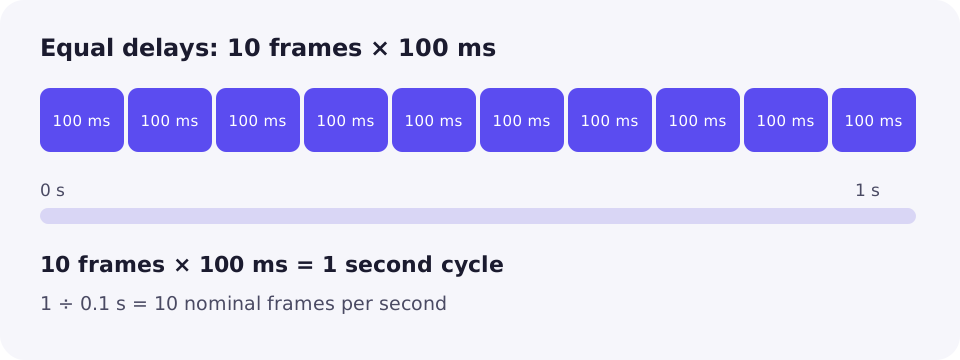
A GIF has no single frame rate. Unlike a video, which usually plays at one fixed rate such as 24 or 30 frames per second, a GIF stores a separate delay for every frame. The speed you perceive is just those delays added up. If every frame waits 100 milliseconds, the animation runs at a nominal 10 frames per second — but that number is calculated from the delays, not stored in the file, and different viewers may not play it at exactly that speed.
FPS for video, delays for GIFs
Frames per second (FPS) is a video idea. A video file normally declares one frame rate, and the player shows a new frame on a regular schedule: at 30 FPS, a new frame every 33.3 milliseconds; at 60 FPS, one every 16.7 milliseconds. Every frame gets the same slice of time, so the rate fully describes the timing.
A GIF works differently. It is a sequence of images, and the file carries no frame-rate field at all. Instead, each image can be preceded by a control block that says how long that image should stay on screen before the next one appears. Because each frame can wait a different amount of time, there is no single number stored in the file that answers “how many FPS is this GIF?”. You can only work a number out from the delays — and that number is an approximation, not a property of the format.
That distinction matters when tools disagree: a video editor reporting “30 FPS” reads a declared rate, while a tool reporting a GIF's FPS is doing arithmetic on its delays — and two tools can average those delays differently.
Each frame carries its own delay
The timing lives in the Graphic Control Extension, the block that appears before an image in the file. The GIF89a specification defines its Delay Time field as an unsigned two-byte number: “If not 0, this field specifies the number of hundredths (1/100) of a second to wait before continuing with the processing of the Data Stream,” with the clock starting as soon as the image has been rendered (GIF89a specification, Graphic Control Extension).
Three consequences follow. First, delays are whole hundredths of a second: a frame can wait 10 ms, 20 ms or 30 ms, but never 15 ms or 16.7 ms. Second, the largest two-byte value is 65,535 hundredths, about 655 seconds — the maximum delay of one frame, not of the whole animation. Third, the specification only defines non-zero delays; a delay of 0 is left to the viewer, which is one reason playback differs between apps.
Because each delay belongs to its own frame, a GIF can hold some frames longer than others: a quick flash, a normal step, then a long pause on the final frame. That flexibility is exactly what a single FPS figure cannot express.
How to calculate nominal FPS
When every frame uses the same delay, the calculation is simple. Divide one second by the delay of one frame:
nominal FPS = 1 ÷ frame duration in seconds
For a 100 ms delay, that is 1 ÷ 0.1 = 10 nominal FPS. For 50 ms, 1 ÷ 0.05 = 20. For 200 ms, 1 ÷ 0.2 = 5. The word “nominal” matters: it signals that the figure is calculated from the stored delays, not measured during playback and not guaranteed by any viewer.
| Delay per frame | Delay in hundredths | Nominal FPS | Notes |
|---|---|---|---|
| 200 ms | 20 | 5 | Slow, readable motion |
| 100 ms | 10 | 10 | Common for simple animations |
| 50 ms | 5 | 20 | Brisk motion |
| 40 ms | 4 | 25 | A frequent video-like rate |
| 30 ms | 3 | 33 | Nearest encodable value to 30 FPS |
| 20 ms | 2 | 50 | Fastest delay browsers reliably honour |
| 10 ms | 1 | 100 nominal | Viewers typically slow this to about 100 ms |
The same delays also give you the cycle duration: multiply the frame count by the delay. A GIF with 24 frames at 50 ms each runs one cycle of 24 × 0.05 = 1.2 seconds. If it loops, that 1.2-second cycle simply repeats; looping does not change the frame rate.
Why some frame rates cannot exist
Because delays snap to whole hundredths, only certain nominal rates are encodable: 100, 50, 33, 25, 20, 16.7, 14.3, 12.5, 11.1, 10, and so on. A true 60 FPS GIF would need 16.7 ms per frame, which the format cannot express; the closest options are 20 ms (50 nominal FPS) and 10 ms (100 nominal FPS before viewers intervene). Likewise, nominal 30 FPS is really 33 FPS at 30 ms, or 25 FPS at 40 ms — there is no exact 30.
Variable delays: why one FPS number can mislead
The formula above only works when every frame waits the same time. With variable delays, you must add the delays up first, and the average that comes out can hide what the animation actually does.
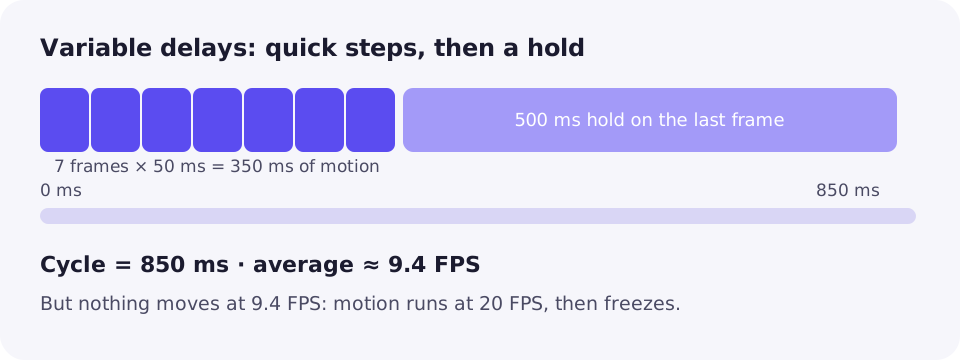
Take a GIF with eight frames: seven at 50 ms and a final frame held for 500 ms. The cycle lasts 7 × 50 + 500 = 850 ms, and 8 frames ÷ 0.85 seconds gives an average of about 9.4 frames per second. But nothing in the animation moves at 9.4 FPS: seven quick steps play at 20 FPS, then the picture freezes for half a second. Describing that file as “9.4 FPS” is arithmetically correct and practically misleading.
The honest description is the delays themselves, or the cycle plus a note about the hold: “8 frames, 850 ms cycle, with a 500 ms hold on the last frame.” A single FPS figure is only safe when delays are equal, or when you label it as a cycle average.
Encoded timing versus observed playback
The delays in the file are the encoded timing — what the creator asked for. What you see is observed playback, and viewers may differ. The gap shows up in a few predictable places.
Very short delays get slowed down
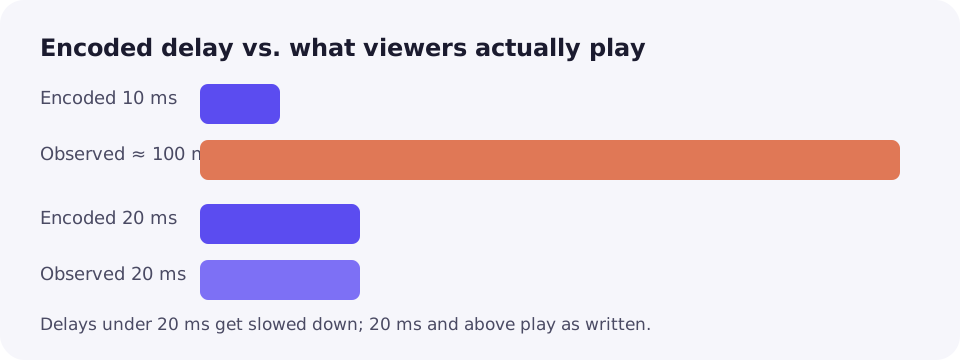
Delays below 20 ms are the classic case. The only whole-hundredth values under 20 ms are 0 and 10 ms, and major browsers have long refused to play them at face value: Chromium's code uses 100 ms for any frame specifying 10 ms or less, and Firefox normalizes very small timeouts the same way, a behaviour documented from browser source comments (The Fastest GIF Does Not Exist). The practical result is a trap: setting a 10 ms delay to make a GIF faster makes it play at about 10 FPS instead, slower than a 20 ms delay would. That is why 20 ms — 50 nominal FPS — is the fastest delay worth using in a browser, and why ZipGIF's own speed tool treats 20 ms as the floor below which frames must be dropped rather than sped up further.
Refresh rate and decoding load
Even with sensible delays, playback is not metronome-precise. A 60 Hz screen can only show a new image about every 16.7 ms, so a 20 ms frame may be displayed for one or two refresh intervals — a small jitter you would rarely notice. A slow device can also fall behind on large frames, and some apps convert GIFs to video or show only the first frame. In all these cases the file's nominal FPS has not changed; the viewer's rendering of it has.
Rule of thumb: nominal FPS describes the file; what one viewer does is an observation about that viewer. For consistent playback everywhere, keep delays at 20 ms or above.
Changing delays, dropping frames, duplicating frames
Three ways to change how fast a GIF feels are not interchangeable. Start from a GIF with 10 frames at 100 ms: a 1-second cycle at 10 nominal FPS.
| Method | What changes | Frames | Cycle | Effect |
|---|---|---|---|---|
| Scale the delays | Every delay × the same factor | 10 | 0.5 s at 50 ms | Faster, same motion steps, size barely changes |
| Drop frames | Remove every other frame, keep 100 ms | 5 | 0.5 s | Faster and choppier: half the motion steps are gone |
| Duplicate frames | Show each frame twice at 50 ms | 20 | 1 s | Looks identical, file slightly larger |
Scaling delays preserves the motion except its speed, because every frame keeps its place and its share of the timing. Dropping frames throws motion away: the animation jumps between kept frames, so it looks choppier even at the same cycle duration. Duplicating frames adds nothing new — each image simply appears twice in a row — so it cannot smooth motion, and it costs extra bytes.
That is also why changing delays alone barely changes file size, while dropping frames usually shrinks a file and duplicating frames grows it. If a GIF plays too fast, scale its delays up; if it is also too large, drop frames as a separate step rather than expecting the slowdown to shrink it. ZipGIF's speed changer works by scaling delays from 0.1× to 8×, and when a speed-up would push delays under the 20 ms browser floor it drops frames evenly instead, so the speed you pick is the speed you get.
How to inspect a GIF's frames and timing
Guessing from how a GIF looks is unreliable, because viewers already distort the timing. Read the delays from the file instead. ZipGIF's GIF splitter lays every frame out in a grid with its number and its delay printed underneath, such as #12 – 40 ms, which makes the arithmetic easy: add the delays for the cycle duration, and divide the frame count by that duration if you want the average rate.
For example, suppose the grid shows 12 frames: eleven at 40 ms and a final frame at 400 ms. The cycle is 11 × 40 + 400 = 840 ms, averaging 12 ÷ 0.84 ≈ 14.3 FPS — but the useful description is the split one: motion at 25 FPS, then a 400 ms hold. Any editor or frame viewer that lists per-frame delays gives you the same raw material; the splitter's grid is simply a quick way to see it without installing anything.
Troubleshooting
The GIF plays much slower than you set it
Check for 0 ms or 10 ms delays: viewers slow those to about 100 ms, so a GIF built for speed ends up ten times slower than intended. Raise short delays to 20 ms or above.
The same GIF plays at different speeds in different apps
That is viewer behaviour, not file corruption: clamping, refresh timing and decoding speed all vary. Delays of 20 ms or more give the most consistent result.
A “60 FPS GIF” looks no smoother than a 50 FPS one
It cannot be 60 FPS: the format cannot express 16.7 ms delays. The file is almost certainly playing at 50 FPS, or is a video labelled as a GIF.
An FPS figure from one tool disagrees with another
One may average variable delays while the other reports the most common delay, or one shows nominal FPS while the other measured playback. Compare the per-frame delays, not the headline numbers.
FAQ
Can a GIF be 60 FPS?
Not exactly. 60 frames per second needs a frame every 16.7 ms, and GIF delays can only be whole hundredths of a second. The nearest encodable delays are 20 ms (50 nominal FPS) and 10 ms (100 nominal FPS, which browsers typically slow down). A file sold as a “60 FPS GIF” is usually a video in disguise, or a GIF rounded to a nearby rate.
What frame delay should I use for a smooth GIF?
Start from the motion you already have, not a target number. Smoothness comes from source frames showing small steps of movement; a delay only sets how long each step is shown. As a working range, 20 to 50 ms per frame (50 to 20 nominal FPS) covers most animations, and delays below 20 ms are wasted because viewers slow them down.
Does a higher FPS make a GIF file bigger?
Not by itself. File size depends on frame count, dimensions, colours and how much changes between frames. Shortening delays raises the nominal FPS but keeps the same frames, so the file barely changes size. Adding frames to raise the frame rate, for example when converting from video, does make the file bigger.
Does looping change a GIF's FPS?
No. Looping replays the same cycle of frames. A 2-second cycle at 10 nominal FPS still plays at 10 nominal FPS on every loop; looping changes how long the animation keeps going, not how fast each cycle runs.
Why does my GIF play at different speeds on different devices?
Because stored delays are only a request. Viewers clamp very short delays, screens refresh on their own schedule, and slower devices lag on heavy frames. Some apps also transcode GIFs to video, re-timing them. Delays of 20 ms or more are the most consistent across viewers.
Is the FPS shown by a video tool the same as a GIF's FPS?
Only loosely. A video tool usually assumes one constant frame rate for the whole clip. A GIF has no such field, so any FPS figure for a GIF is derived from its delays. With variable delays that figure is an average across the cycle, not a promise about how any single moment plays.
Sources
- W3C: Graphics Interchange Format, Version 89a — Graphic Control Extension, Delay Time in hundredths of a second.
- MDN: Image file type and format guide — GIF as a basic animation format using 8-bit indexed colour.
- The Fastest GIF Does Not Exist — browser source comments on clamping of sub-20 ms delays, from Chromium 98 and Firefox 97-era code.
Viewer behaviour changes over time. The clamping details above reflect the linked browser-source evidence and ZipGIF's current tool behaviour; a viewer update could change observed playback.
Short version: a GIF has no frame rate of its own — it has delays. Add them up for the cycle, divide for a nominal FPS, and remember that number is not a promise about playback. If your GIF's timing looks wrong, inspect its per-frame delays before assuming the file is broken.