How Long Can a GIF Be? Duration, Loops and Upload Limits
By Shafiullah Tareen, creator of ZipGIF · Published
The GIF format sets no short duration cap. One animation cycle lasts as long as its frame delays add up to, and a loop can replay that cycle endlessly. The limits you actually hit come from platforms, file size, and what browsers and devices can decode comfortably.
Is there a maximum GIF duration?
Not in the way most people expect. A GIF is a sequence of images, and each image can carry a delay value that says how long to wait before showing the next one. The GIF89a specification defines that delay in hundredths of a second, stored in a two-byte field (GIF89a specification). The largest value that fits is 65,535 hundredths, or about 655 seconds.
That number is the maximum delay of one frame, not a limit on the whole animation. A file can contain many frames, and their delays add together. So the format has no single built-in total GIF duration cap. That does not make GIFs literally unlimited: every extra frame adds bytes, takes memory to decode, and may hit a rule wherever you upload it.
Format limits versus platform rules
When someone asks "how long can GIFs be", the honest answer depends on where the GIF is going. The format describes what a file can store. A platform decides what it will accept, and those rules differ from service to service and change over time.
One cycle versus a looping GIF
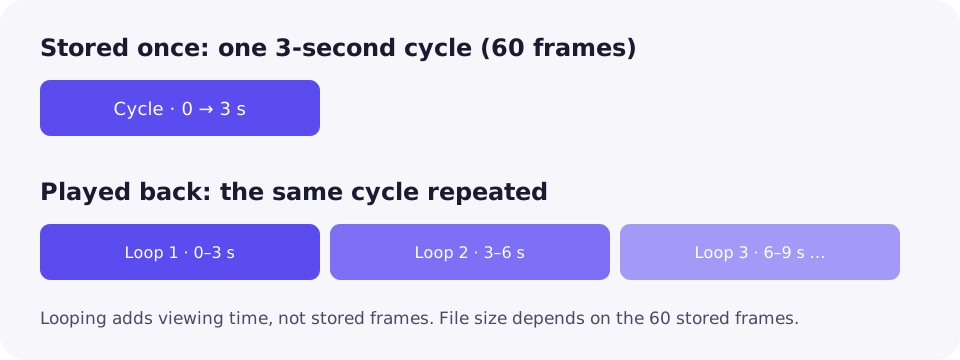
How long is a GIF, then? There are two answers. The cycle duration is the time it takes to play every frame once. The viewing time is how long it keeps playing, which depends on looping.
Looping is controlled by a loop count. It is not part of the original GIF89a text; it comes from a widely supported application extension (often called the Netscape loop extension) that the specification's extension mechanism allows (GIF89a, Application Extension). A loop count of zero is commonly read as "repeat forever".
This is why a three-second animation can appear to run all day. The file holds three seconds of frames; the viewer simply starts again at frame one. The GIF loop count changes behaviour, not the number of stored frames, so it barely affects file size.
How to calculate GIF duration
The rule is simple:
total cycle duration = sum of every frame delay
Constant GIF frame delay
If every frame uses the same delay, multiply. A GIF with 60 frames at 0.05 seconds (50 ms) each lasts 60 × 0.05 = 3 seconds.
| Frames | Delay per frame | Cycle duration |
|---|---|---|
| 30 | 100 ms | 3 s |
| 60 | 50 ms | 3 s |
| 120 | 50 ms | 6 s |
Variable delays
Many GIFs hold some frames longer than others, such as a pause on the last frame. Then you must add each delay instead of assuming a frame rate. Example: 10 frames at 50 ms plus one final frame at 1,000 ms gives 10 × 0.05 + 1.0 = 1.5 seconds. Treating it as "11 frames at 20 fps" would give 0.55 seconds, which is wrong.
To see the real delays, inspect individual GIF frames and read the timing of each one.
One practical note: many browsers treat very small delays (for example 0 or 1 hundredth of a second) as a slower default, so the same file can play at different speeds in different apps.
Platform duration limits versus recommendations
Here the numbers depend entirely on the service. Keep three things apart: hard limits, softer recommendations and file-size limits.
GIPHY
GIPHY's creation guidance says uploads are limited to 15 seconds and recommends no more than 6 seconds. It also limits uploads to 100 MB while recommending 8 MB or less (GIPHY: GIF Creation Best Practices). These are GIPHY's rules for GIPHY uploads only. They are not limits of the GIF format.
How long can a GIF be on Discord?
Discord does not publish a separate duration limit for GIFs that we could find. What it does publish is a file-size limit for attachments. Its File Attachments FAQ says the free upload limit is 20 MB as of August 2026, with larger limits for Nitro subscribers (Discord: File Attachments FAQ). Older Discord pages still mention 10 MB, so check the linked page before you rely on a number. Custom emoji must be under 256 KB (Discord: How to Add Custom Emojis).
In practice, a long Discord GIF fails because of bytes, not seconds. If yours is rejected, compress a GIF for Discord with a target-size preset.
Other services
Messaging apps, social networks and ad platforms each set their own rules and often convert GIFs to video. We have not listed their numbers here because we could not verify current official values. Check the help page of the service you are using.
Why longer GIFs often become larger
A longer GIF usually has more frames, and more frames usually means more bytes. But several things decide how much:
- Frame count: each frame adds image data.
- Dimensions: a 800×600 frame has four times the pixels of a 400×300 frame.
- Colours: each frame can use up to 256 colours; fewer colours compress better.
- Scene complexity: noise, gradients and camera movement compress poorly.
- Frame reuse and optimisation: a frame can store only the area that changed and leave the rest of the previous frame in place, so static backgrounds cost little.
Because of that last point, GIFs do not always store every frame as a full image, and file size is not perfectly linear with length. Doubling the duration of a calm animation may add far less than double its size; doubling a shaky phone clip can cost more.
How to shorten a GIF without confusing crop and trim
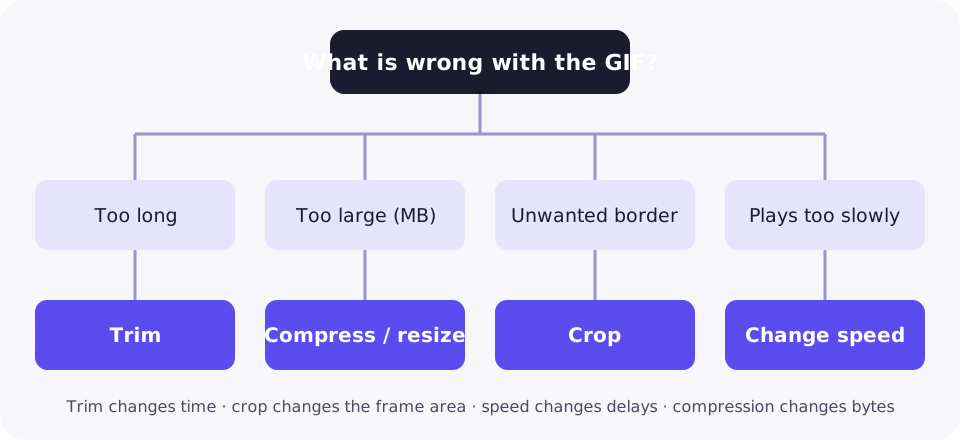
These four edits are often mixed up:
- Trim removes time: frames at the start or end.
- Crop removes area: edges of every frame. The duration stays the same.
- Change speed rewrites frame delays. Duration changes, frames stay.
- Compress reduces bytes through optimisation, colours or size.
A practical ZipGIF workflow
- Open the trimmer and trim a GIF by choosing the start and end of the section you want to keep. The new duration is shown before you download.
- If the moment is right but plays too slowly or too quickly, change GIF playback speed.
- If the file is still too large, reduce GIF file size using manual settings or a target file size.
- If the canvas is bigger than it needs to be, resize an animated GIF; smaller dimensions usually save the most bytes.
All of these tools run in your browser, so the GIF is not uploaded to a server.
A worked example: trimming a synthetic GIF
The numbers below come from an earlier synthetic sample processed in a sandbox: a generated test animation, not a real-world clip. They are not new live ZipGIF benchmarks. They show how frame count, duration and size relate for one file; your results will vary with content and settings.
| Version | Frames | Duration | Approx. size |
|---|---|---|---|
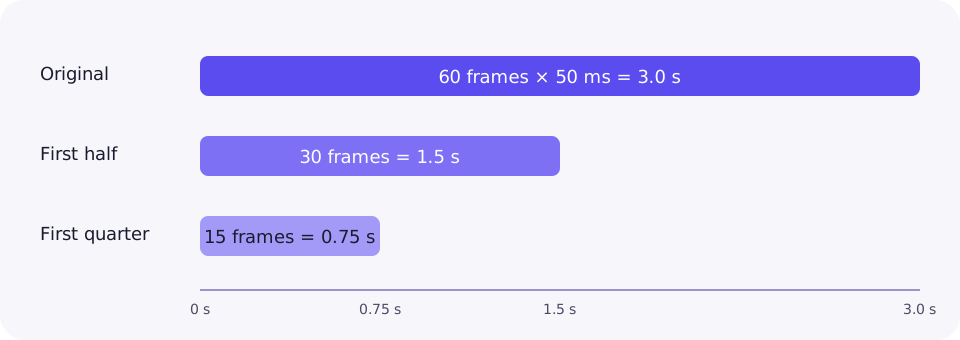
| Original | 60 | 3.0 s | ~300 KB |
| First half | 30 | 1.5 s | ~152 KB |
| First quarter | 15 | 0.75 s | ~79 KB |
Here, halving the frames roughly halved the size, and a quarter of the frames came to roughly a quarter. The arithmetic matches the duration rule: 30 × 50 ms = 1.5 s and 15 × 50 ms = 0.75 s.
When MP4 or WebP makes more sense
GIF is an old format with a 256-colour palette per frame and no modern video compression. For long clips, real footage or anything with sound, a video format such as MP4 or WebM is usually far smaller. Many sites already convert uploaded GIFs to video for that reason.
On your own website, a muted, looping video element can behave like a GIF. Animated WebP is another option supported by current browsers. GIF still wins where compatibility matters most, such as some email clients, chat apps and older software that only shows images. ZipGIF works on GIFs and does not convert to video, so use a video editor for that step.
Troubleshooting
The upload is rejected
Check the service's size rule first, then its duration rule. Trim the ends, then compress or resize until the file fits.
The GIF appears endless
It is probably set to loop forever. The stored cycle may be only a few seconds long.
It plays at a different speed elsewhere
Very short delays are often slowed down by browsers and apps. Use slightly longer delays, such as 20 ms or more, for consistent playback.
The animation is missing
Some apps show only the first frame, or convert the GIF to a still image or video. Try sending it as a file, or check that the file really contains more than one frame.
The trimmed file is still large
Trimming only removes time. Large dimensions, noisy footage and many colours keep each remaining frame heavy, so resize or compress as the next step.
FAQ
Can a GIF be 30 seconds?
Yes. The format allows it. A 30-second GIF is usually large, though, so check the destination's duration and file-size rules first. GIPHY, for example, limits uploads to 15 seconds.
Can a GIF be one minute?
The file format can hold a minute of frames, but the result is often many megabytes and slow to decode. For a minute of footage, a short MP4 or WebM is usually the better choice.
Does looping increase the number of stored frames?
No. A loop replays the frames already in the file. A 3-second cycle set to loop forever still stores only those 3 seconds of frames.
How do I check a GIF's duration?
Add up the delay of every frame. A frame viewer that lists each frame and its delay makes this easy; if every frame has the same delay, multiply the frame count by that delay.
Does speeding up a GIF make it smaller?
Not by itself. Shorter delays change playback time but keep the same frames, so the file size barely moves. Size drops when frames are removed, the canvas gets smaller or colours are reduced.
Is a platform recommendation a file-format limit?
No. A rule such as GIPHY's 15-second upload limit belongs to that service. It says nothing about what the GIF format itself can store.
Sources
- W3C: Graphics Interchange Format, Version 89a
- GIPHY: GIF Creation Best Practices
- Discord: File Attachments FAQ
- Discord: How to Add Custom Emojis on Discord
Platform rules change. Numbers above were taken from the linked pages on the publication date.