What Is the Best Free GIF Maker?
By Shafiullah Tareen, creator of ZipGIF · Published
There is no single best free GIF maker, because the makers are not competing at the same thing. Some turn video into GIFs, some caption memes, some design animated graphics, and some edit GIFs you already have. The honest answer is conditional: the best maker is the one that matches what you are starting with — and that does not stamp a watermark on the result or quietly upload your private files.
What “free” actually means
“Free GIF maker” hides at least six different questions, and two tools can both be free while answering them oppositely. Before comparing names, compare these:
- Price and watermark. Is the export really free, or is the free tier a trial that stamps a watermark on the result? A watermark is the single most common disappointment in this category.
- Signup. Can you make a GIF without creating an account, or does the tool hold your first export hostage behind a login screen?
- Where your file goes. Is it uploaded to a server for processing, or processed in your browser on your own device? For a reaction GIF this barely matters; for a private photo or a work file it matters a lot.
- What you can start from. Video, still images, or an existing GIF? Most tools cover one or two of these well and the third not at all.
- What you can add. Text, stickers, effects, templates — or just edits to timing, size, and frames?
- Output control. Can you set frame delays, dimensions, and file size, or do you get whatever the tool decides?
Every claim about a named tool in this article was checked against that tool's own pages in October 2026, except where the text says otherwise. Tools change their limits and pricing without notice, so if a number below decides your choice, open the linked source and confirm it before you commit to a workflow.
The five makers, side by side
Five makers cover almost every free use case: GIPHY, EZGIF, Canva, Imgflip, and ZipGIF's own toolset. Here they are on the criteria that actually decide the choice. “Uploaded” means your file leaves your device for processing; “in browser” means it never does.
| Maker | Watermark on free export | Signup | Where files go | Video import | Text & effects |
|---|---|---|---|---|---|
| GIPHY | No | Account required to create | Uploaded, hosted on GIPHY | Yes — uploads up to 15 seconds, 100 MB | Captions, stickers, filters |
| EZGIF | No | None | Uploaded, deleted 1 hour after upload | Yes — up to 200 MB per file | Text, crop, resize, optimize tools |
| Canva | No, with free elements only | Account required | Uploaded, saved in your account | Yes, via its video editor | Text, templates, effects, transitions |
| Imgflip | Yes, unless you pay for Pro | None to start; login to save online | Uploaded | Yes — uploads and video URLs | Text, stickers, drawings, motion |
| ZipGIF | No | None | In browser, never uploaded | No | No — editing only |
Read the table by elimination, not by score. If a watermark is a deal-breaker, Imgflip's free tier is out. If you will not create an account, GIPHY and Canva are out. If your file must not leave your device, only ZipGIF's row survives — and then your starting point has to be a GIF or a set of still images, because ZipGIF takes no video. The profiles below explain what each maker is actually good at, rather than just what it claims.
Each maker in brief
GIPHY: best for quick social GIFs from video
GIPHY's maker takes a video upload or a video URL, lets you trim it, decorate it with captions, stickers, and filters, and publishes the result to the GIPHY platform, where it can be shared and embedded. Its own best-practices page limits uploads to 15 seconds and 100 MB, recommends 8 MB or less, and notes that fewer than 100 frames works best (GIPHY GIF Creation Best Practices). Creating requires a free GIPHY account, and the result lives on GIPHY's platform rather than being a private file on your device. Choose GIPHY when the GIF is meant to be shared socially and you are happy for it to exist on a public platform. Skip it when you want a private file, a long clip, or fine control over frames and file size.
EZGIF: best all-round free editor, with one privacy trade-off
EZGIF is a set of single-purpose tools rather than one editor: a GIF maker from images, a video-to-GIF converter, and separate crop, resize, optimization, and text tools. Its maker page states it plainly: free, no watermarks, no signup, no conversion limits (EZGIF GIF Maker). Its video-to-GIF page accepts MP4, WebM, AVI, MOV, and other formats up to 200 MB, and states that uploaded files are automatically deleted one hour after upload (EZGIF video to GIF). That deletion policy is the honest version of the trade-off: your file does leave your device, but not permanently, and there is an optional local-processing mode for browser-side work with some features limited. Choose EZGIF when you need video import plus real editing control without paying or signing up. Skip it only when the file must never leave your device at all.
Canva: best for designed, animated graphics
Canva is a design tool first and a GIF maker second: you build a design or a short video from templates, add text, effects, and transitions, and export it as a GIF. It requires an account, and its free plan is genuinely usable — exports made with free elements carry no watermark, while designs that include premium elements carry a watermark unless you subscribe to Pro (Canva licensing; free users see a watermark on Pro content, removable by buying a licence or subscribing to Pro). That distinction is the trap to watch: a design that looks free can stop being free the moment one premium stock element slips in. Choose Canva when the GIF needs to look designed — a branded announcement, a polished social post, a templated layout. Skip it when you want a quick conversion, no account, or frame-level control over an existing GIF.
Imgflip: best for classic captioned memes
Imgflip's maker builds GIFs from video uploads, video URLs (including YouTube and Vimeo), or still images, and its own page lists text, images and stickers, fonts, cropping, rotation, resizing, reversing, and motion among its features (Imgflip GIF Maker). It is the fastest path to a captioned meme, and you can start without an account (login is only needed to save creations online). The catch is stated on the same page: free GIFs carry a small “imgflip.com” watermark, and disabling it completely requires a paid Pro account. Choose Imgflip when the meme matters more than the watermark. Skip it when the output must be clean on the free tier.
ZipGIF: best for private editing of GIFs you already have
ZipGIF is not a general maker, and this article will not pretend it is. It is a set of editing tools — compressor, cropper, resizer, speed changer, splitter, trimmer, GIF-to-PNG — plus a PNG-to-GIF tool that builds a GIF from still images. Everything runs in your browser: the tool pages state that files are read on your device and never uploaded, with no signup and no watermark on the output. That is the strongest privacy story in this comparison, and the reason to choose ZipGIF when the GIF already exists or the source is a set of pictures, and when the file is private, for work, or simply not something you want on a server. The price of that privacy is scope, covered honestly in the section below: no video import, and no text, sticker, or effects tools.
The verdict: pick by your starting point
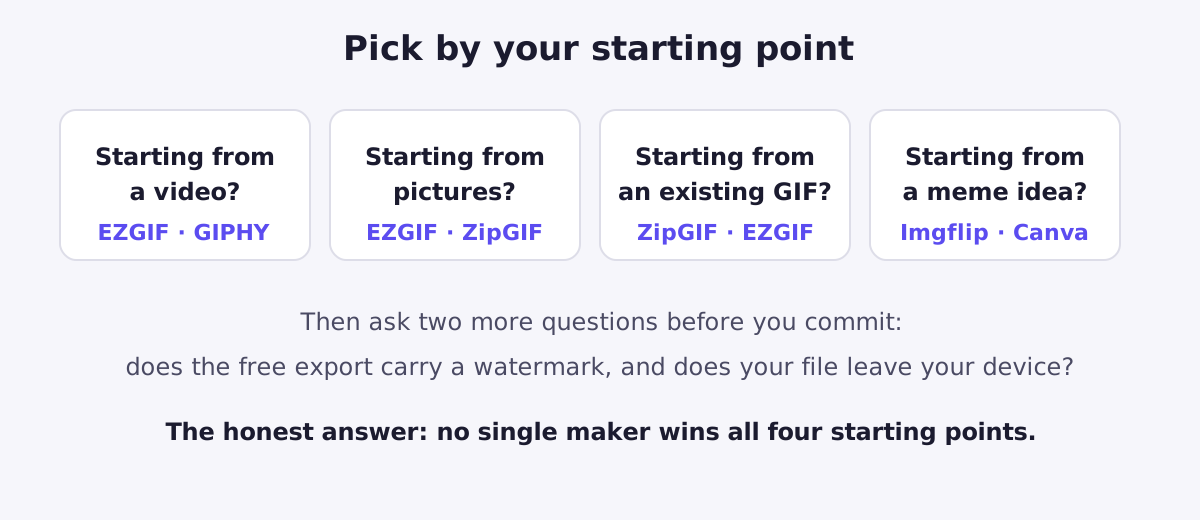
If you take one thing from this article, take the decision rule: start from what you already have, then apply your two deal-breakers — watermark and privacy. The table below is the whole verdict in one place.
| If you want… | Use… | Because… |
|---|---|---|
| A GIF from a video, free, no watermark, no signup | EZGIF | Video import up to 200 MB, no watermark, no account |
| A GIF from a video to share socially | GIPHY | Trim, captions, stickers, and built-in sharing |
| A GIF from still images, kept private | ZipGIF's PNG-to-GIF tool | Images never leave your device, no signup, no watermark |
| To fix an existing GIF: smaller, cropped, resized, slower, shorter | ZipGIF's editors | Frame-accurate editing in your browser, nothing uploaded |
| A captioned meme, fast | Imgflip | Text, stickers, and video URLs in one place — accept the watermark |
| A designed, animated graphic | Canva | Templates, text, and effects — stick to free elements |
Notice what this verdict does not say. It does not crown ZipGIF, because ZipGIF cannot do the two things most people mean by “making a GIF”: starting from a video, and adding text. A comparison that hides its own sponsor's gaps is an advertisement, not a guide, and it would also mislead you into starting a project here that you cannot finish here. The next section states those gaps plainly, with workarounds.
What ZipGIF deliberately doesn't do
Two limits, stated without softening. First, ZipGIF has no video import: every editing tool accepts GIF files only, and the image-to-GIF tool accepts still images (PNG, JPG, WebP). Drop a video file onto any of them and it will be refused, because the tools are built around GIF frames, not video decoding. Second, ZipGIF has no text, sticker, or effects tools: nothing here captions a meme, draws on a frame, or applies a filter. The toolset edits timing, size, frames, and compression — it does not decorate.
Both limits have honest workarounds that keep the privacy benefit where it matters most. For video, convert the clip elsewhere — EZGIF's video-to-GIF tool is free with no watermark — and then bring the resulting GIF to ZipGIF for the finishing work: compress it to the size your destination allows, crop it to the part that matters, resize it to its display size, trim it to the moment you want, or change its speed without choppiness. For text, caption the GIF in Imgflip, Canva, or EZGIF first, then edit the captioned result here. And if your starting point is already a set of pictures, skip the workaround entirely: the PNG-to-GIF tool builds the animation from your images, with per-frame delays, entirely on your device. Knowing which half of the job belongs where is the difference between a tool that disappoints you and a combination that works.
FAQ
Is there a completely free GIF maker with no watermark and no signup?
Yes, more than one. EZGIF's maker is free with no watermark and no signup, and ZipGIF's tools are free with no watermark and no signup. The difference between them is what they accept and where your file goes: EZGIF takes video and uploads your file to its servers (deleted one hour after upload), while ZipGIF processes everything in your browser and never uploads anything — but it cannot take video at all.
Can I make a GIF from a video without uploading it anywhere?
Not easily, and not with ZipGIF, which has no video import. EZGIF offers an optional local-processing mode that runs in your browser, but it warns that some features are limited in that mode. For most people, video-to-GIF still means uploading the clip to some service; if the clip is private, keep it short, use a service that states a deletion policy, and delete the result from the service afterwards where that is possible.
Why do some free GIFs come out with a watermark?
Because the watermark is how the free tier pays for itself. Imgflip is open about this: its own GIF maker page explains the small “imgflip.com” watermark and says a paid Pro account disables it completely. If a watermark would ruin your GIF — for work, for a client, or for a clean meme — rule out watermarked free tiers before you spend time editing.
Is it safe to upload a personal GIF to a free maker?
It depends on the service's stated policy and on how private the material is. EZGIF states that uploaded files are automatically deleted one hour after upload, which is better than indefinite storage — but the file still leaves your device during processing. For anything you would not want on someone else's server, even briefly, prefer a tool that processes in your browser, like ZipGIF's editors.
What is the best free GIF maker for memes?
Imgflip, for classic captioned memes: it is built around text, stickers, and quick video-to-GIF, and its own page lists text, fonts, cropping, rotation, resizing, and motion among its features. The trade-off is the watermark on free exports. If the meme needs to look designed rather than captioned — custom fonts, brand colours, a template layout — Canva's free plan is the better fit, as long as you stick to free elements.
Does ZipGIF make GIFs from videos?
No, and this article does not pretend otherwise. ZipGIF's tools accept GIF files for editing and still images (PNG, JPG, WebP) for building a new GIF. If your starting point is a video, convert it elsewhere first — EZGIF's video-to-GIF tool is the free, no-watermark option — then bring the resulting GIF to ZipGIF for compressing, cropping, resizing, trimming, or changing its speed.
Sources
- EZGIF: Animated GIF Maker — free, no watermark, no signup, no conversion limits; frame files up to 50 MB.
- EZGIF: MP4 video to GIF converter — formats accepted, 200 MB maximum, files deleted one hour after upload, optional local processing mode.
- GIPHY: GIF Creation Best Practices — uploads limited to 15 seconds and 100 MB, 8 MB or less recommended.
- Imgflip: GIF Maker — video and image sources, text and sticker features, and the free-tier watermark with Pro removal.
- Canva: Licensing — free users see a watermark on Pro content.
Platform rules change. The external limits and policies above were taken from the linked pages in October 2026; if a limit decides your choice, check the platform's current page before relying on it. The ZipGIF claims in this article — GIF-only editing inputs, still-image input for PNG-to-GIF, no video import, no text or effects tools, and in-browser processing with nothing uploaded — were verified against the site's own tool code, not borrowed from marketing copy.